
What the Marketplace does today. And what it does not yet.
From building the offer through the buyer's order to fulfilment. We only describe what works in the interface today.
Features checked in the user interface:
01 · Building the offer
Set it up once, then just send.
Your buyers, products and prices go in once. A wizard builds the offer from them and checks it before sending.
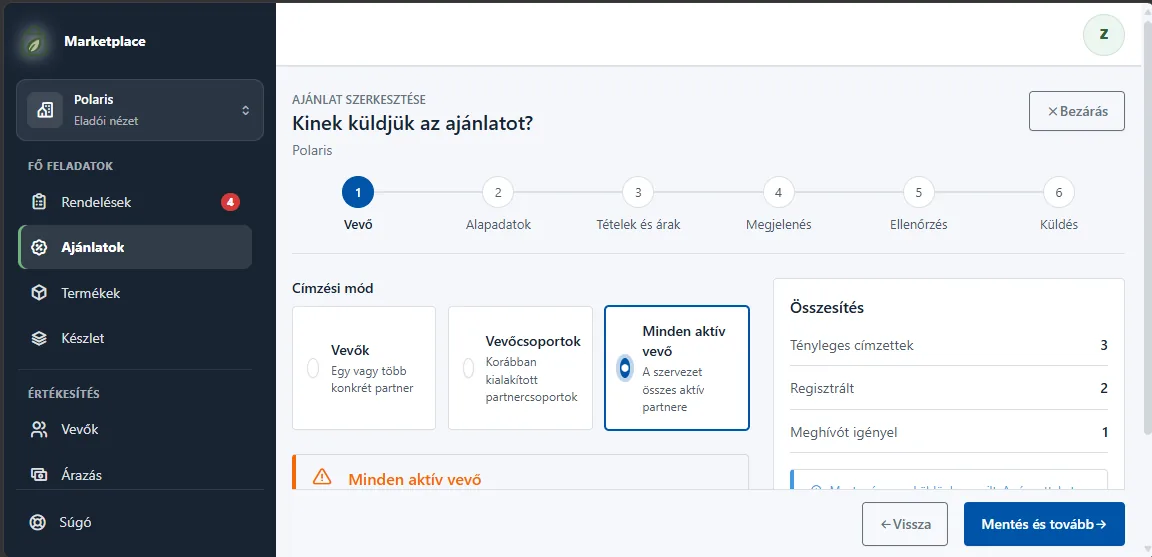
Buyers and buyer groups
Add buyers and sort them into groups by dragging. Invitation by e-mail with a 6-digit PIN code. Access can be revoked at any time.
Product catalog
Name, SKU, unit (pcs, kg, l, pack), short and long description, image and category. Product images are visible only to authorized buyers.
Price lists, custom prices
Price lists with VAT rates. Prices for a group or a single buyer without touching the others. The most specific price always applies.
Six-step offer wizard
Buyer, basics, items and prices, design, check, send. Recipients can be several buyers, one buyer group or all active buyers.
Design and preview
Visual templates: colours, font, background, header and footer. Desktop and mobile preview before sending.
Check before sending
Warns about missing stock, missing prices, inactive products, an expired validity period and missing recipients.
Validity period
An offer can have a start and an end. Outside that period the buyer does not see it and cannot order from it.
Copying an offer
One click turns an earlier offer into a new draft with its items. You choose the recipients again.
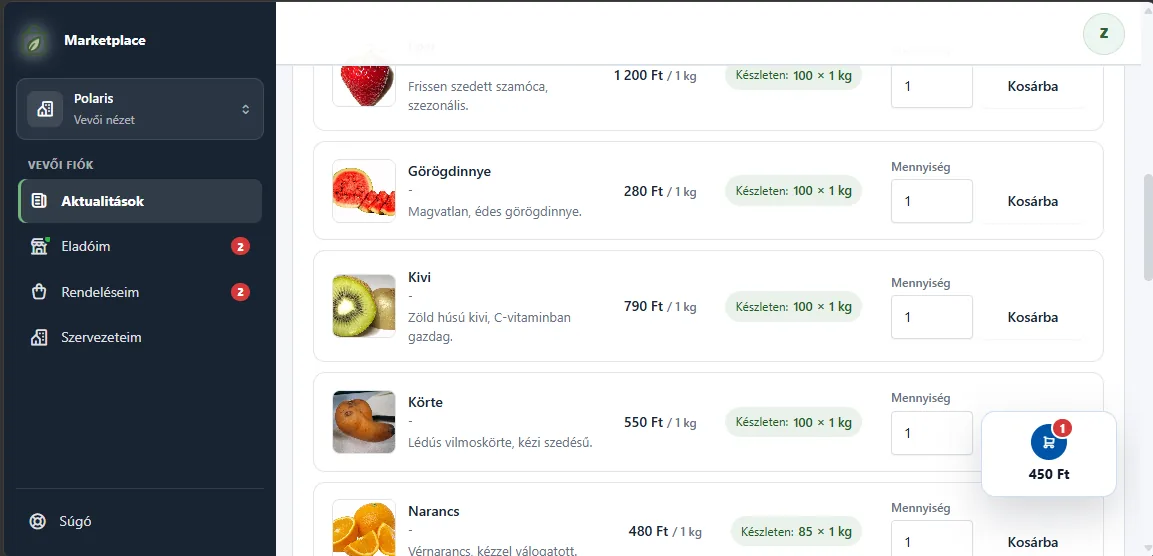
02 · Buyer ordering
Buyers see only their own.
Their own products, their own prices, a cart, an order. In the browser, with nothing to install.
With an account or without registration
As a registered buyer, or with a private link and a PIN code. Guest access lasts at most 24 hours and expires after 60 minutes of inactivity.
Stock, if you want
When switched on, buyers see the available quantity ("In stock: 100 × 1 kg"). When off, only whether an item can be ordered.
Cart and submission
Quantity, cart, submit. The buyer gets a confirmation e-mail and is notified of every status change.
Cancellation until a deadline
Buyers can cancel an order until the deadline you set (0–168 hours, 24 by default). The reserved stock is then released.
Registered buyer area
Updates, My sellers, My orders. New offers appear by themselves, without a new invitation.
From guest to registered buyer
When a guest opens an account, their earlier orders move over, matched by their verified e-mail address.
03 · Processing and operations
Every order in one place, with its whole story.
You confirm, partly accept, fulfil. Stock and buyer notifications follow along by themselves.
The path of an order
- Submitted
- Conditionally reserved
- Confirmed / Partially approved
- Fulfilling
- Completed
Side branch: Rejected or Cancelled. The reserved stock is released at once.
Partial confirmation
Line by line you set how much you can deliver. The buyer gets one summary e-mail about the changed items.
Stock tied to orders
Reserved on submission, deducted on fulfilment, released on rejection or cancellation. Low-stock flag and stock movement log.
Who opened it, who ordered
Per offer and per buyer: sent, opened the offer, ordered. Orders grouped by buyer.
Order list
Search by buyer name, company or e-mail, filter by status. The summary shows ordered quantities next to the stock.
E-mail notifications
Invitation, offer, confirmation, status change. Editable templates and a send log. Your own SMTP with the Pro plan.
Team and log
Colleagues in your organization (5 users with Pro). A log of business and security events.
Security
Two-factor authentication with an authenticator app or an e-mail code. Data separated per organization, limited PIN attempts.
Customizable dashboard
A nine-card dashboard you can rearrange by dragging, with a setup guide to get started.
Hungarian and English
The interface is Hungarian and English. When signed in, it can be installed on a phone as an app.
What it cannot do yet
Honestly: these are still missing.
- Online payment for buyersin development
- Automatic invoicing, invoicing software connectionin development
FAQ
Questions about how it works.
What happens to the stock if I reject an order?
The reservation is released at once and the quantity can be ordered again.
Can a buyer change an order after sending it?
They can cancel it until the deadline, but not change it. They can place a new order instead.
Can I see who opened the offer?
Yes. For each buyer you see whether they received it, opened the offer page and ordered.
Does the buyer need to install an app?
No. It works in any browser, on a phone too.
Are orders confirmed automatically?
No. You confirm every order, so nothing goes out without your check.
See it with your own products.
Every Pro feature free for 15 days. No card needed. The HUF 29,900 introductory price is valid until 31 October 2026.