
What is Polaris Marketplace? In one minute.
A private ordering page for your repeat buyers. You send the offer, buyers order at their own prices, and you see every order in one place.
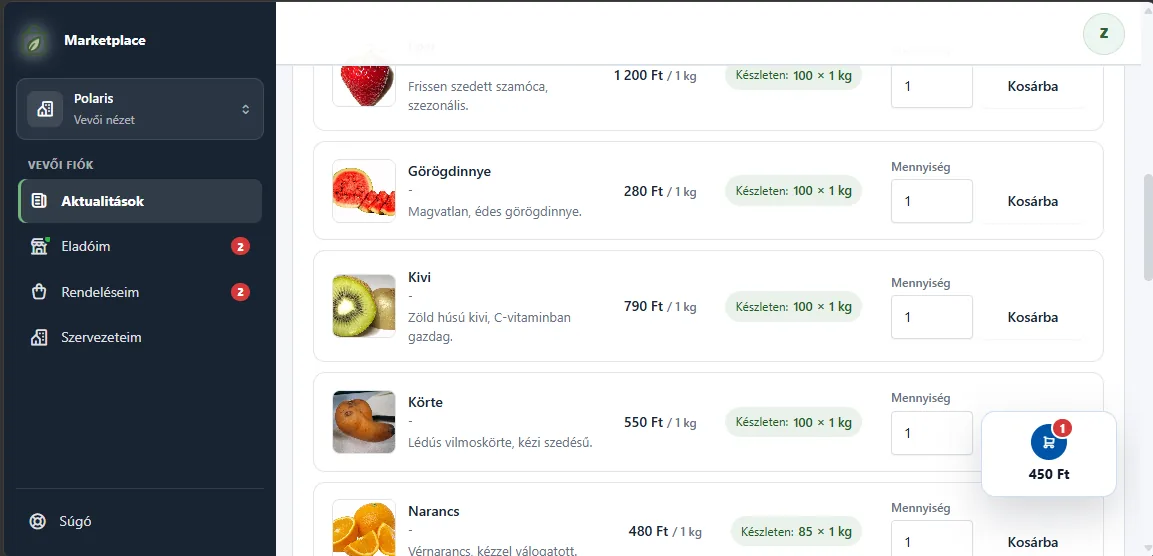
What is it?
A closed ordering page, only for your buyers.
Not a web shop that anyone can wander into. Only the people you invite can order, and each of them sees only the prices meant for them.
It is
- A private offer for the buyers you invite.
- Different prices per buyer or per group.
- Ordering with an account, or without registration, with a PIN code.
- Orders, stock and notifications in one place.
It is not
- Not a public web shop.
- Not an ERP and not accounting software.
- No online payment or invoicing yet. Both are in development.
What is it good for?
Less back and forth. Fewer mistakes.
No more orders by phone
Buyers order when it suits them. You no longer copy orders by hand from texts and chat messages.
Everyone sees their own price
Price lists with VAT, a separate price for a group or a single buyer. Buyers cannot see each other's prices.
Every order in one place
One list shows who ordered what, and how far fulfilment has got.
No selling the same item twice
A submitted order reserves the stock. Rejecting or cancelling releases it.
Short of stock? Confirm part of it
Set per line how much you can supply. The buyer gets one summary e-mail.
See who looked
For each buyer: received, opened the offer, ordered.
Who is it for?
If you sell to the same buyers, again and again.
It pays off when you know your buyers and they order from you regularly.
- Producers, farms
- Bakeries, pastry shops
- Wholesalers
- Suppliers
- Wineries, artisan food
- Craftspeople, small workshops
It is not for you if you are looking for a public web shop, or you need online payment right now.
How to use it
Six steps to your first order.
As a seller
Sign up
E-mail, confirmation code, name and password, then your business name. About 2 minutes, no card needed.
Add your products
Name, unit, picture, description. A few products are enough to start.
Set your prices
A price list with VAT rates. If needed, a separate price for a group or a single buyer.
Add your buyers
Name and e-mail address. You can also sort them into groups, for example "Restaurants" and "Shops".
Send the offer
The wizard guides you through six steps. Before sending, it tells you if anything is missing.
Process the orders
Confirm, confirm in part or reject. The buyer gets an e-mail at every step.
After you sign in, the setup guide takes you through exactly these steps and shows what is already done.
On your buyers' side
They receive the offer
By e-mail, with a private link. Without an account, they also get a 6-digit PIN code.
They open it and fill the cart
They see only the products and prices meant for them. It works on a phone too, nothing to install.
They send it and follow it
They get a confirmation e-mail and hear about every change. They can cancel until the deadline.
Examples
What it looks like in practice.
Made-up businesses, real-life situations.
-
Bakery
Daily orders for shops and cafés
Every evening the texts and calls come in for tomorrow's bread, each at a different price.
- One offer for the "Resellers" group, at their own prices.
- Buyers order the day before; in the morning you see a ready list.
- You set a cancellation deadline, for example 12 hours.
-
Fruit and vegetable grower
A fresh weekly offer for restaurants
Each week brings a different harvest, and quantities are limited.
- You copy last week's offer and only update the items.
- If you like, buyers also see how much is still in stock.
- If the harvest was smaller, you confirm the order in part.
-
Wholesaler, supplier
One price for shops, another for the big partner
You sell the same product at several prices, and it is easy to get wrong.
- A base price list for everyone, a group price for shops.
- A custom price for one key partner, without touching the others.
- A price list in euros for buyers abroad.
-
Winery, artisan cheese
A seasonal offer for regular buyers
New items come a few times a year, and regular buyers should order in time.
- You set how long the offer is valid, for example two weeks.
- You see who opened it and who has not ordered yet, so you can follow up.
- Buyers can order without registration, with a PIN code.
FAQ
Questions about getting started.
How long does it take to get started?
Registration takes about 2 minutes. After that, the setup guide leads you step by step to your first offer.
Do I need to install anything?
No. It works in the browser, on a computer and on a phone. Once signed in, you can also add it to your phone as an app.
Do my buyers need to register?
No. They can order with a private link and a 6-digit PIN code. If they want, they can open an account later.
What does it cost to try?
Nothing. For 15 days every Pro feature is free, no card needed. Afterwards the account continues on the Free plan without data loss.
Where do I get help if I get stuck?
The application has a searchable help for sellers and buyers. During the trial and on Pro you can also ask us for help from there.
Try it with your own products.
Every Pro feature free for 15 days. No card needed. The HUF 29,900 introductory price is valid until 31 October 2026.